Orders
This guide offers detailed information about the various order types available on the platform, as well as the execution instructions supported for each.
Orders are a fundamental component of any algorithmic trading strategy. nexustrader has integrated a wide range of order types and execution instructions, from standard to advanced, to maximize the potential functionality of trading venues. This allows traders to set specific conditions and instructions for order execution and management, enabling the creation of virtually any type of trading strategy.
Overview
There are two categories of orders in NexusTrader:
Basic OrderLimit OrderMarket OrderPost-Only Order(OrderType.POST_ONLY)Take-Profit / Stop-Loss OrderBatch OrderModify Order
Algorithmic OrderTWAP
Basic Orders
Create a basic order using create_order():
from nexustrader.strategy import Strategy
from nexustrader.constants import OrderSide, OrderType
from decimal import Decimal

class Demo(Strategy):
    def on_bookl1(self, bookl1):
        self.create_order(
            symbol="BTCUSDT-PERP.BYBIT",
            side=OrderSide.BUY,
            type=OrderType.LIMIT,
            price=self.price_to_precision("BTCUSDT-PERP.BYBIT", bookl1.bid * 0.999),
            amount=Decimal("0.001"),
        )
Key parameters:
Parameter |
Type |
Description |
|---|---|---|
|
|
Instrument ID (e.g. |
|
|
|
|
|
|
|
|
Order quantity (base currency) |
|
|
Limit price; required for |
|
|
Close existing position only (futures) |
|
|
Override the default account type |
|
|
Re-fetch the latest quote from MT5 at submission time and use it as the
limit price. Accepted values: |
Modify Orders
Change the price or quantity of an open order using
modify_order():
self.modify_order(
    symbol="BTCUSDT-PERP.BYBIT",
    oid=open_order_oid,
    side=OrderSide.BUY,
    price=new_price,
    amount=new_amount,
)
Batch Orders
Submit multiple orders in a single API call using
create_batch_orders():
from nexustrader.schema import BatchOrder

self.create_batch_orders(
    orders=[
        BatchOrder(symbol="BTCUSDT-PERP.BYBIT", side=OrderSide.BUY,
                   type=OrderType.LIMIT, amount=Decimal("0.01"), price=px1),
        BatchOrder(symbol="BTCUSDT-PERP.BYBIT", side=OrderSide.BUY,
                   type=OrderType.LIMIT, amount=Decimal("0.01"), price=px2),
    ]
)
Take-Profit & Stop-Loss Orders
Attach TP and SL legs to a parent order in one call using
create_tp_sl_order():
self.create_tp_sl_order(
    symbol="BTCUSDT-PERP.BYBIT",
    side=OrderSide.BUY,
    type=OrderType.MARKET,
    amount=Decimal("0.001"),
    tp_order_type=OrderType.MARKET,
    tp_trigger_price=self.price_to_precision(symbol, bookl1.ask * 1.001),
    sl_order_type=OrderType.MARKET,
    sl_trigger_price=self.price_to_precision(symbol, bookl1.bid * 0.999),
)
WebSocket Order Submission
Use create_order_ws() and
cancel_order_ws() to submit and cancel orders via the
low-latency WebSocket API (supported on OKX, Binance, Bybit, Bitget, and
HyperLiquid). These methods are lower
latency than the REST equivalents because they avoid an extra HTTP round-trip.
class Demo(Strategy):
    def on_bookl1(self, bookl1: BookL1):
        self.create_order_ws(
            symbol="BTCUSDT-PERP.OKX",
            side=OrderSide.BUY,
            type=OrderType.POST_ONLY,
            amount=Decimal("0.001"),
            price=self.price_to_precision("BTCUSDT-PERP.OKX", bookl1.bid * 0.999),
        )
client_oid and idempotency_key
create_order_ws() also accepts client_oid and idempotency_key.
Use client_oid when you want a deterministic order ID, and
idempotency_key when repeated strategy signals should reuse the same
canonical OID instead of submitting duplicate creates.
self.create_order_ws(
    symbol="BTCUSDT-PERP.OKX",
    side=OrderSide.BUY,
    type=OrderType.LIMIT,
    amount=Decimal("0.001"),
    price=Decimal("90000"),
    client_oid="entry_001",
    idempotency_key="signal:btc:entry",
)
ws_fallback parameter
Both methods accept a ws_fallback keyword argument (default True). When the
WebSocket connection is unavailable and a send fails, the behaviour depends on this flag:
|
Behaviour on connection failure |
|---|---|
|
Transparently retries the same request via the REST API. |
|
Immediately marks the order as |
# Explicit REST fallback (default behaviour)
self.create_order_ws(..., ws_fallback=True)

# Fail fast – no REST retry
self.create_order_ws(..., ws_fallback=False)

# Same options on cancel
self.cancel_order_ws(symbol="BTCUSDT-PERP.OKX", oid=oid, ws_fallback=False)
WS ACK error handling
After sending a WS order or cancel request the OMS waits up to 5 seconds
for an exchange ACK. Three distinct failure modes are possible, each
represented by a WsOrderResultType value:
|
Meaning |
|---|---|
|
The socket was down when the call was made (only when |
|
The exchange explicitly rejected the order/cancel request (e.g. invalid price). |
|
No ACK within 5 s and REST could not confirm the order — state is truly unknown. |
|
No ACK within 5 s but REST confirmed the order exists — treat as success. |
Override on_ws_order_request_result() in your strategy to react:
from nexustrader.constants import WsOrderResultType

class Demo(Strategy):
    def on_ws_order_request_result(self, result: dict):
        rt     = result["result_type"]
        oid    = result["oid"]
        symbol = result["symbol"]

        if rt == WsOrderResultType.ACK_TIMEOUT_CONFIRMED:
            # REST confirmed — the order is live, nothing to do
            self.log.info(f"[{symbol}] order confirmed via REST after ACK timeout: {oid}")

        elif rt == WsOrderResultType.ACK_REJECTED:
            # Exchange rejected — log the reason; optionally retry
            self.log.warning(f"[{symbol}] order rejected: {result['reason']}")

        elif rt == WsOrderResultType.ACK_TIMEOUT:
            # Truly unknown — query REST directly and decide
            order = self.fetch_order(symbol, oid, force_refresh=True)
            if order is None:
                self.log.error(f"[{symbol}] order {oid} missing after ACK timeout — resubmit?")
            else:
                self.log.info(f"[{symbol}] order {oid} found via REST: {order.status}")

        elif rt == WsOrderResultType.REQUEST_NOT_SENT:
            self.log.error(f"[{symbol}] WS was down — request never sent for {oid}")
TWAP Algorithmic Orders
Use create_twap() to split a large order into time-sliced
child orders:
self.create_twap(
    symbol=symbol,
    side=OrderSide.BUY if diff > 0 else OrderSide.SELL,
    amount=abs(diff),
    duration=65,   # total seconds
    wait=5,        # seconds between child orders
    account_type=BybitAccountType.UNIFIED_TESTNET,
)
Order Status

The Order Status is defined in OrderStatus class. We define 4 groups of statuses:
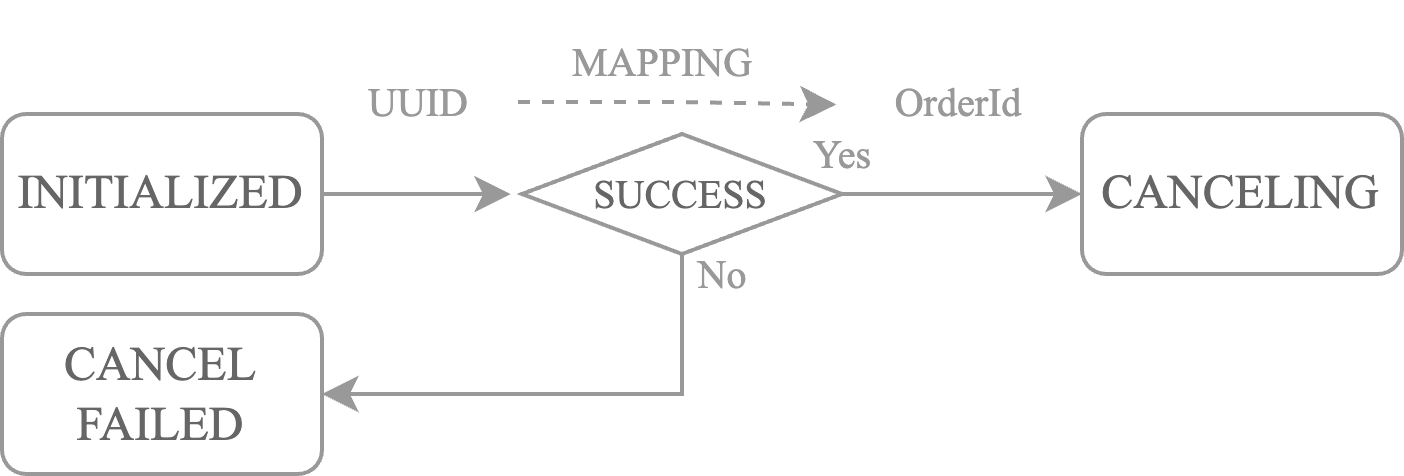
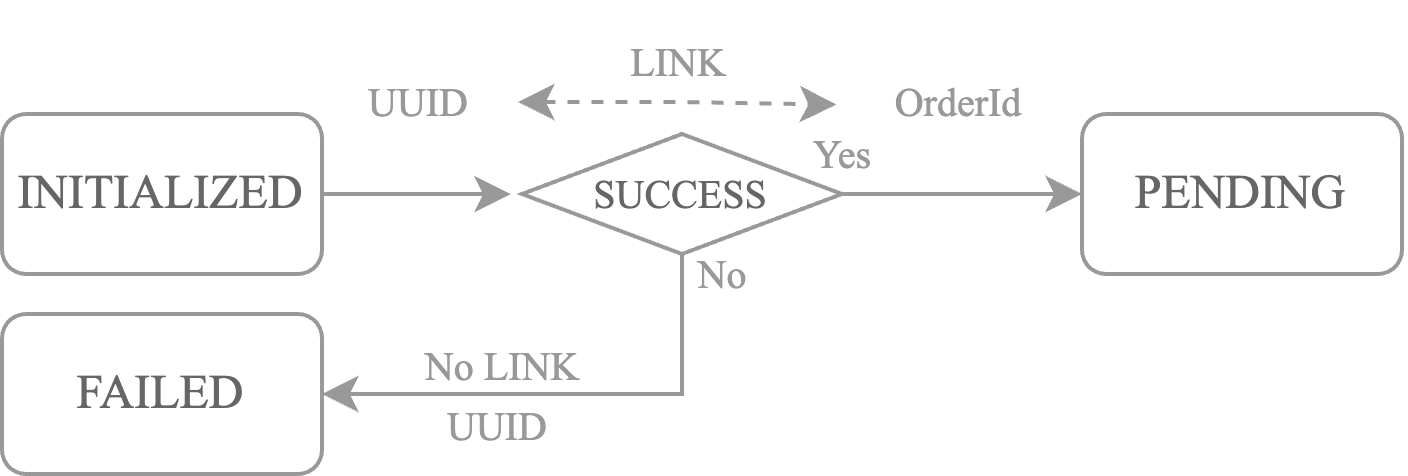
LOCAL: The order is created by the user and not sent to the exchange yet.INITIALIZED: when order is created bycreate_ordermethod orcancel_ordermethodFAILED: when order is failed to be createdCANCEL_FAILED: when order is failed to be canceled
IN-FLOW: The order is sending to the exchange but the websocket response is not received yet.PENDING: when order is pending on the exchangeCANCElING: when order is pending to be canceled
OPEN: The order is open on the exchange which means the websocket response is received.ACCEPTED: when order is accepted by the exchangePARTIALLY_FILLED: when order is partially filled
CLOSED: The order is closed on the exchange which means the order isFILLED,CANCELLEDorEXPIRED.FILLED: when order is filledCANCELLED: when order is cancelled (cancelled by the user).EXPIRED: when order is expired (canceled by the exchange).
When an order transitions to FAILED or CANCEL_FAILED, the reason field contains
a human-readable description of the failure (e.g. an exchange error message). You can inspect
it in the order-status handlers:
def on_failed_order(self, order: Order):
    self.log.error(f"Order {order.oid} failed: {order.reason}")
Inflight Orders & Cancel Intent
Between the moment an order is submitted and the first acknowledgement from the exchange, the order is considered inflight. During this window a rapid cancel request could race with the incoming status update. NexusTrader addresses this with two mechanisms:
Inflight tracking – every order submission registers the OID as inflight. Once the exchange responds (any status update), the OID is removed. Use
cache.get_inflight_orders(symbol)to query the current set, orawait cache.wait_for_inflight_orders(symbol)to block until all resolve.Cancel intent – calling
cancel_orderorcancel_all_ordersimmediately marks the OIDs with a cancel intent synchronously at the Strategy layer, before the cancel request is queued. This prevents the OMS from interpreting a lateACCEPTEDupdate as a newly active order when a cancel is already in progress.
Algorithmic Order
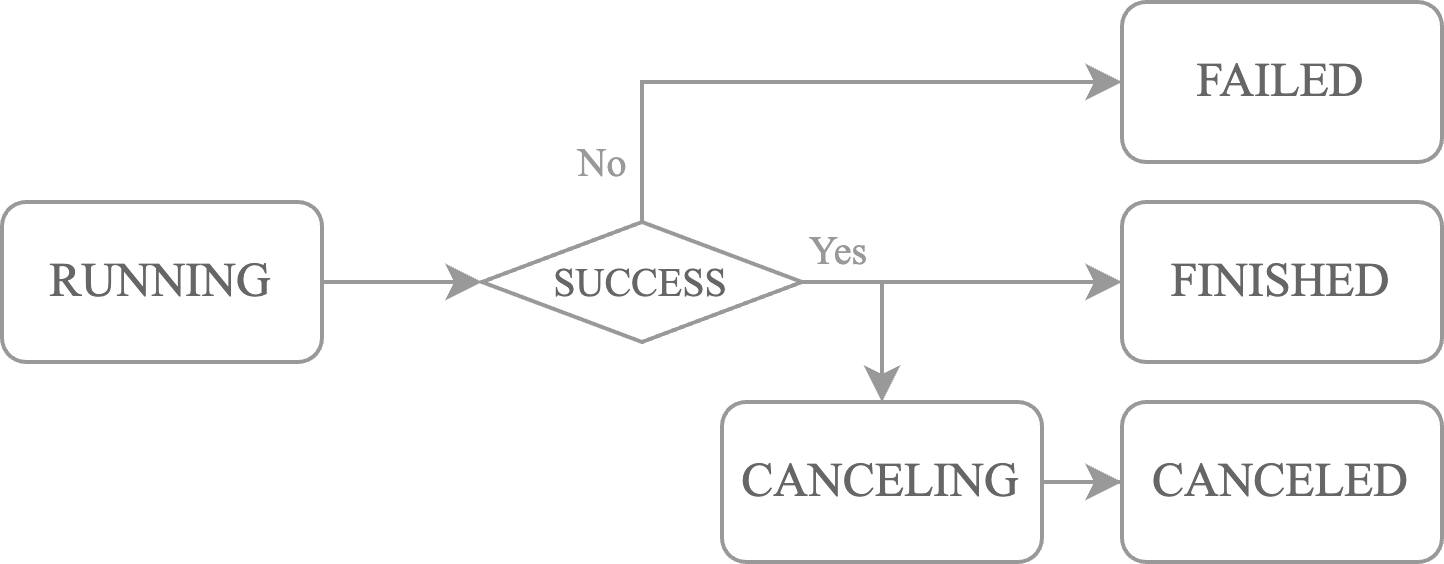
The AlgoOrder is a special type of order that is created by the create_twap method in Strategy class. It is used to create a TWAP order. The status of the AlgoOrder is defined in AlgoOrderStatus class. The TWAP order is used to execute a large order in a series of smaller orders over a specified period of time. There are 5 statuses:
RUNNING: when theTWAPorder is runningCANCELING: when theTWAPorder is cancelingCANCELLED: when theTWAPorder is cancelledFINISHED: when theTWAPorder is finishedFAILED: when theTWAPorder is failed to be created, or one of the orders in theTWAPorder is failed to be created.
Order Linkage
Order Creation
nexustrader uses an internal order and exchange order linkage mechanism. When an internal order is created, i.e., the status is INITIALIZED, an OID (Order ID) is automatically generated internally. When it is submitted to the exchange, if successful, the exchange returns an EID (Exchange Order ID) which is stored on the order. If it fails, the order status is set to FAILED.
Order Cancellation
When an order is canceled, the user specifies the OID of the order to be canceled by calling the cancel_order method in the Strategy class. The OID is used to look up the EID and submit the cancellation request to the exchange.